9 min read

 In this article
A little preparation
Start with one daily moment, such as the half hour before dinner or the time after nursery. Choose the one that causes the most friction, because a small, specific change is easier to keep than a general promise to use screens less. Decide the plan between the adults first: who says ‘time to stop’, what happens if it runs over, and which activity follows. Children notice when two grown-ups give two different answers.
Then explain it to your child in two or three plain sentences, at a moment when nobody is holding a device. ‘After one episode, the tablet goes in the drawer and we lay the table together.’ Check your device settings yourself before you begin, because a timer or a parental control that cuts the picture without warning can feel like a trick. For guidance on how much screen use is sensible at your child’s age, follow the advice of your national health service or your paediatrician. Expect the first week to be bumpy, and keep the plan the same for at least five days before you judge it.

What to know and try
Choose the ending before you begin
A limit feels fair when it is attached to something the child can see finishing, such as one episode, two levels or one song playlist. ‘Ten more minutes’ is vague for a young child, while ‘when the dog in this story gets home’ is something they can watch for. Agreeing the end in advance also removes the sudden stop that triggers the strongest protests.
 You’ll need
- The programme, game or playlist you are about to open
- A kitchen timer or clock with a clear face
- Your child, sitting next to you for the agreement
How to do it
- Look at what is about to be played and find a natural finish, such as the end of one episode.
- Say the ending aloud before you press anything: ‘We will watch one episode, then the tablet sleeps.’
- Ask your child to say it back in their own words, or to point to the clock.
- Give a quiet five-minute notice and name the next thing: ‘Then we are making pasta.’
- When the ending arrives, turn the screen off yourself and offer a hand, a hug or a job straight away.
Make it your own: For two-year-olds, keep the agreement to one short sentence and one gesture, such as waving goodbye to the screen. Older children can choose which episode or level counts as ‘one’, and can hold the timer.
Show time with a picture reminder strip
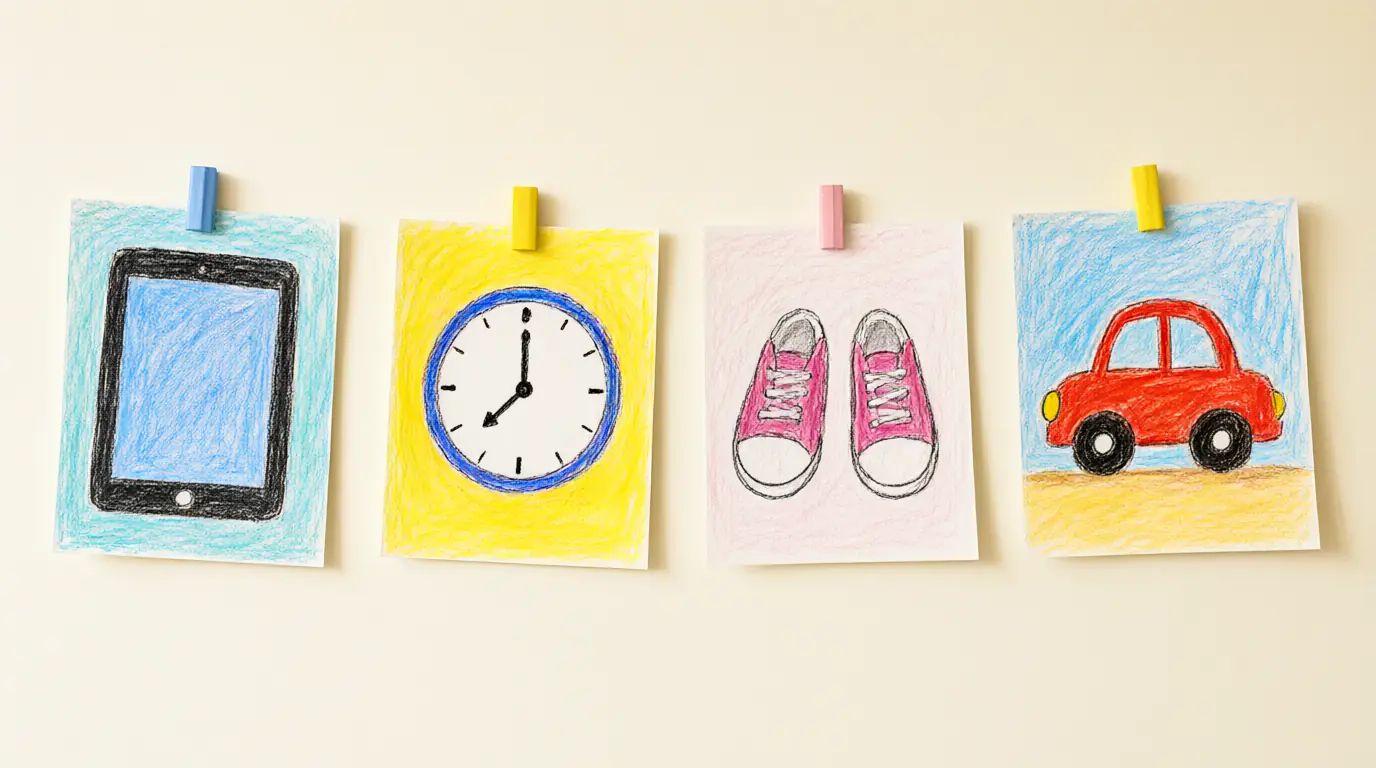
Young children can’t easily picture ‘twenty minutes’, but they understand a row of pictures that shows what happens first and what comes next. A simple strip lets the routine do the talking, so you are no longer the person who ‘ended the fun’; the strip simply shows what happens next. It also gives your child a small job, moving a card along as each step finishes.
You’ll need
- Four cards cut from thick paper
- Crayons or stickers for simple drawings
- A strip of card or a ribbon to line them up on
- Reusable putty or a paperclip to fix the strip to the wall
How to do it
- Draw or stick one picture per card: a screen, a clock, a pair of shoes or a plate, and a favourite game.
- Let your child decorate at least one card so the strip belongs to them.
- Arrange the cards in the order they happen and fix the strip at your child’s eye level.
- When screen time starts, touch the first card and say what comes next.
- Invite your child to turn the screen card face down when it ends, then point to the next picture together.
Make it your own: With toddlers, use only two cards, ‘screen’ and ‘play’. Five- and six-year-olds can draw their own strip and add a small tick box for each finished step.
Switch off the automatic next step
Many apps and video services start the next episode or a new level on their own, which can make any ending you planned seem arbitrary. Taking ten minutes to look at the settings yourself, away from your child, removes that surprise. A single episode that really finishes is much easier to stop watching than a stream that carries on while you are talking.
You’ll need
- The device your child uses
- Ten calm minutes on your own
- A note of which settings you changed
How to do it
- Open the settings of each app your child uses and look for autoplay, auto-next or similar options.
- Turn off notifications and pop-ups that could pull your child into something new.
- Choose a single programme or game in advance instead of the home screen, so there is less browsing.
- Test the end of an episode yourself and see what appears on screen.
- Tell your child what to expect when it finishes: ‘The screen will go quiet and that is our cue.’
Make it your own: If your child uses a shared family device, create a separate profile or a short list of chosen programmes. Older children can help you find and switch off the settings, which also teaches them how the apps work.
Prepare a handover basket
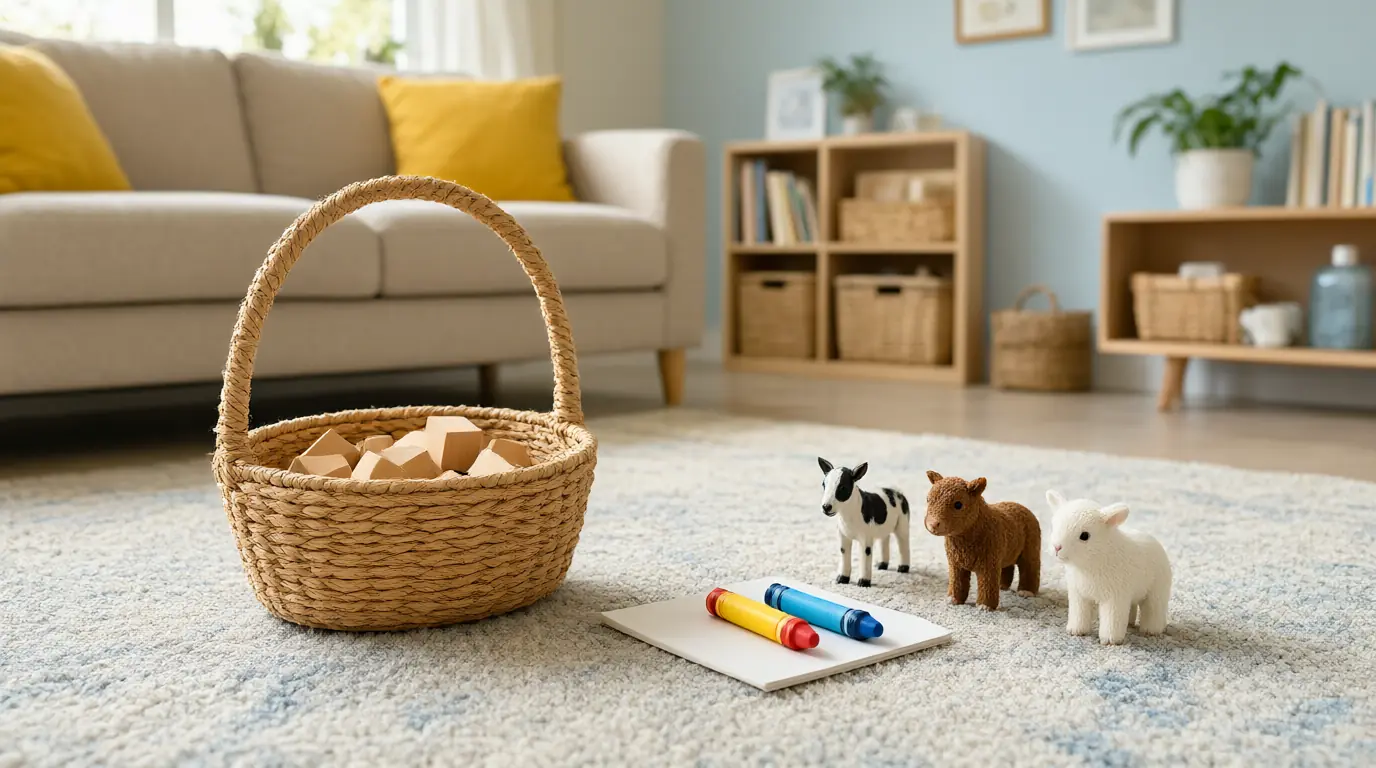
Stopping is hardest when the alternative is vague. A basket packed in advance with one or two things that are ready to use turns ‘find something else to do’ into ‘come and see what is in here’. Choose items that are easy to start without help and that your child cannot do on a screen, such as building, drawing or pretend play.
You’ll need
- A shallow basket or box
- Five or six large wooden blocks or stacking cups
- A small pad and thick crayons
- A toy animal family or toy vehicles
How to do it
- Fill the basket while your child is busy elsewhere and keep it hidden or out of reach until screen time ends.
- Place it on the floor in the room where screen time finishes, so the next activity is already in view.
- As the screen goes off, sit down beside the basket and pick up one item, saying nothing about the screen.
- Offer a specific start: ‘The cows need a barn. Can you build one?’
- Join for the first few minutes, then step back once your child is absorbed.
Make it your own: Swap the contents every few days so the basket stays interesting. For older children, add a simple challenge card, such as ‘build a bridge long enough for the toy car to cross’.
Review the plan together on a calm day
A plan that nobody ever revisits becomes a set of rules that children simply endure. A short talk at a settled moment, such as a weekend breakfast, shows your child that their opinion matters and gives you a chance to adjust. It also lets you describe your own habits honestly, since children notice how adults use phones and tablets.
You’ll need
- Your picture strip or notes
- A piece of paper and a pen
- A time when nobody is tired or hungry
How to do it
- Pick a calm moment away from the device and say: ‘Let’s see how our screen plan is going.’
- Ask which part felt easy and which part felt hard, and listen without defending the rule.
- Share one thing you found hard yourself, such as putting your own phone away at dinner.
- Agree on one small change and write or draw it on the strip.
- Set a day to look at it again, so the change feels temporary and fair.
Make it your own: For younger children, ask only one question, such as ‘What was your favourite thing we did after the tablet?’. Older children can help set screen-free zones, such as the dinner table and the bedroom.

Make it work for your family
Feelings about stopping are normal, even when the plan is clear and fair. Say what you see (‘You wanted to see what happens next’), stay near, and then move straight to the handover activity instead of reopening the debate. If you give in once to a long protest, the protest becomes part of the routine, so keep the ending the same and keep your voice kind.
If one transition keeps going badly, change the set-up rather than the child: move the screen to a shorter slot, pick a finishing point that matches a natural break, or begin the next activity earlier. Children who watch a show alone often find stopping harder than those who watch with you, so sitting beside them for part of it can help. You will also find ideas for the minutes afterwards in these screen-free play ideas for toddlers at home and these family activities that need almost no set-up.

Parents also ask
How much screen time is right for a young child?
There is no single figure that suits every family. Health services in different countries publish age-based guidance, so check the current advice for your child’s age. Pay attention to what the screen replaces, such as sleep, meals, movement and play, as well as the minutes on the clock.
What should I do when my child has a meltdown at the end of screen time?
Stay calm, name the feeling briefly, and keep the ending the same. Offer comfort and move on to the planned activity instead of arguing. If meltdowns are frequent, shorten the session, choose a clearer stopping point or begin the next activity earlier.
Is it better to use a timer or a show-length limit?
For young children, a finishing point they can see, such as the end of one episode, usually works better than a clock. A timer is useful as a notice a few minutes before the end, especially if your child can see or hear it and knows what comes next.
Sources & further reading
Explore these primary sources for further context on this topic.
Choose materials and activities that suit your child, supervise as needed and adapt the ideas to their interests and abilities. About our editorial approach